If you've ever wished buffer-switching in Emacs felt a bit more like what you find in modern editors like VS Code or Sublime Text, the centaur-tabs package might just be the upgrade you're looking for. While Emacs excels at managing multiple open buffers, the experience can sometimes feel abstract—especially for users coming from tab-oriented editors. centaur-tabs brings a visual and intuitive tabbed interface to Emacs, improving buffer organization without compromising its flexible nature.
What Is Centaur Tabs?
centaur-tabs is a modern Emacs package that adds a graphical tab bar for buffer management. Inspired by other editor User Interfaces but deeply integrated with Emacs conventions, it provides a clean and efficient way to group, navigate, and manage buffers through visually distinct tabs.
Why Use Centaur Tabs?
🔹 Visual Buffer Switching
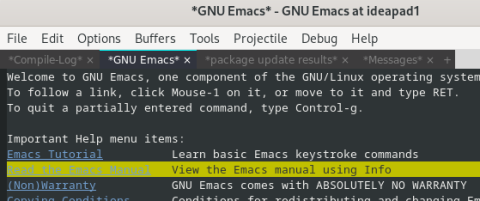
At a glance, centaur-tabs shows you all your open buffers as horizontal tabs—like tabs in a browser or modern code editor. This can make it much easier to find and switch between files, especially when working on large projects.
🔹 Grouping and Filtering
You can configure how tabs are grouped—for example, by project, by major mode, or even manually. This adds structure to your workspace and helps reduce visual clutter by showing only what’s relevant to your current task.
🔹 Mouse and Keyboard Friendly
Tabs can be clicked with the mouse, scrolled with the mouse wheel, or navigated with custom keybindings. It blends well with Emacs’s powerful keyboard-centric workflow while also supporting users who prefer or supplement with mouse interaction.
🔹 Highly Customizable
From tab separators and icons to grouping logic and styling, centaur-tabs can be tailored to your preferred aesthetic. Whether you're using Doom Emacs, Spacemacs, or vanilla Emacs, the package is flexible enough to fit into your configuration.
🔹 Smooth Integration
It works well with projectile, evil-mode, and many other popular packages, making it a great addition to most modern Emacs setups. It’s also performant, with sensible defaults that won’t bog down your editor.
Getting Started
To install with use-package, simply add this to your config:
You can customize appearance using themes and icons, or even set different styles ("wave", "chamfer", "rounded", etc.) for the tabs to match your UI preferences.
Final Thoughts
centaur-tabs is a great example of Emacs extensibility in action. If you’re looking for a cleaner, more visual way to handle your buffers and enhance your Emacs experience, it’s well worth checking out. While it doesn’t replace traditional buffer switching tools like ivy, helm, or consult, it complements them beautifully by adding a layer of visual structure to your workflow.